ShowcallerSwitcher Try the test build
In testing · From Showcaller Studio

A full production switcher for NDI shows.

Showcaller Switcher is a two M/E switcher that runs on a Mac. Cut and mix NDI cameras, key graphics and lower thirds, play clips, mix the sound and record the show, all from one control panel, with a multiview on a second screen.

Showcaller Switcher
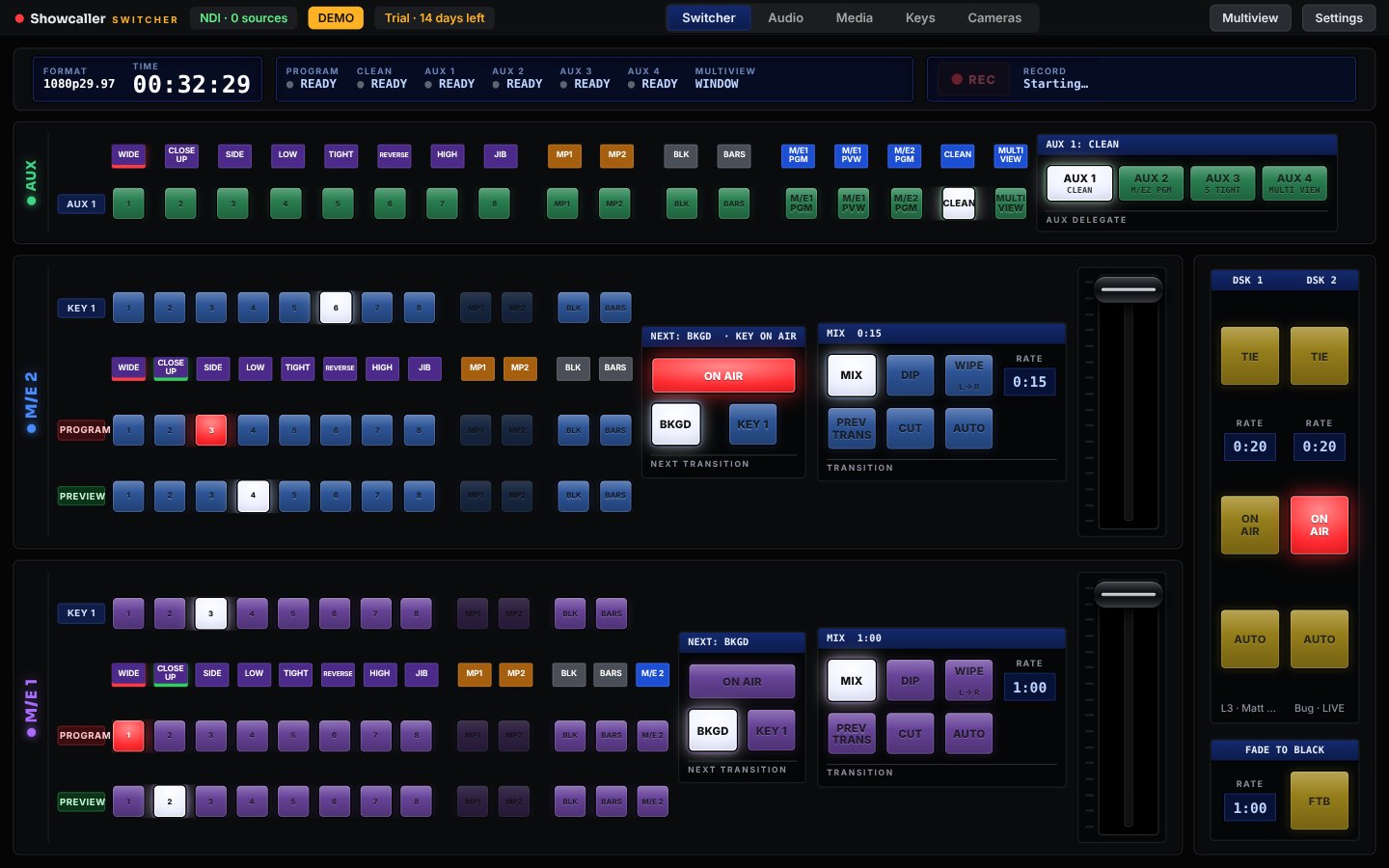
The switcher page: an aux row, M/E 2 and M/E 1 with program and preview rows, transitions, downstream keys and fade to black
2 M/Es, 4 auxM/E 2 feeds M/E 1
8 to 20 inputsNDI, capture cards, clips, stills
NDI out up to 4KProgram, clean feed, aux 1–4
Records the showProRes or H.264 with timecode
What it does

Everything a small control room needs.

A panel that looks like a real switcher.

Laid out like a hardware panel, with coloured rows for the aux, M/E 2, M/E 1 and the downstream keys, a name on every button and tally that shows what's on air. Press preview, then CUT or AUTO, or pull the fader.

  • Two M/Es, with M/E 2 as a source on M/E 1
  • Mix, dip and seven wipe patterns, with your own rates
  • Fade to black
  • Four aux buses, each sent out as its own NDI feed
  • 8 inputs on screen at a time, up to 20 with SHIFT
The switcher page with M/E 1, M/E 2 and the aux row

Keys, lower thirds and animated graphics.

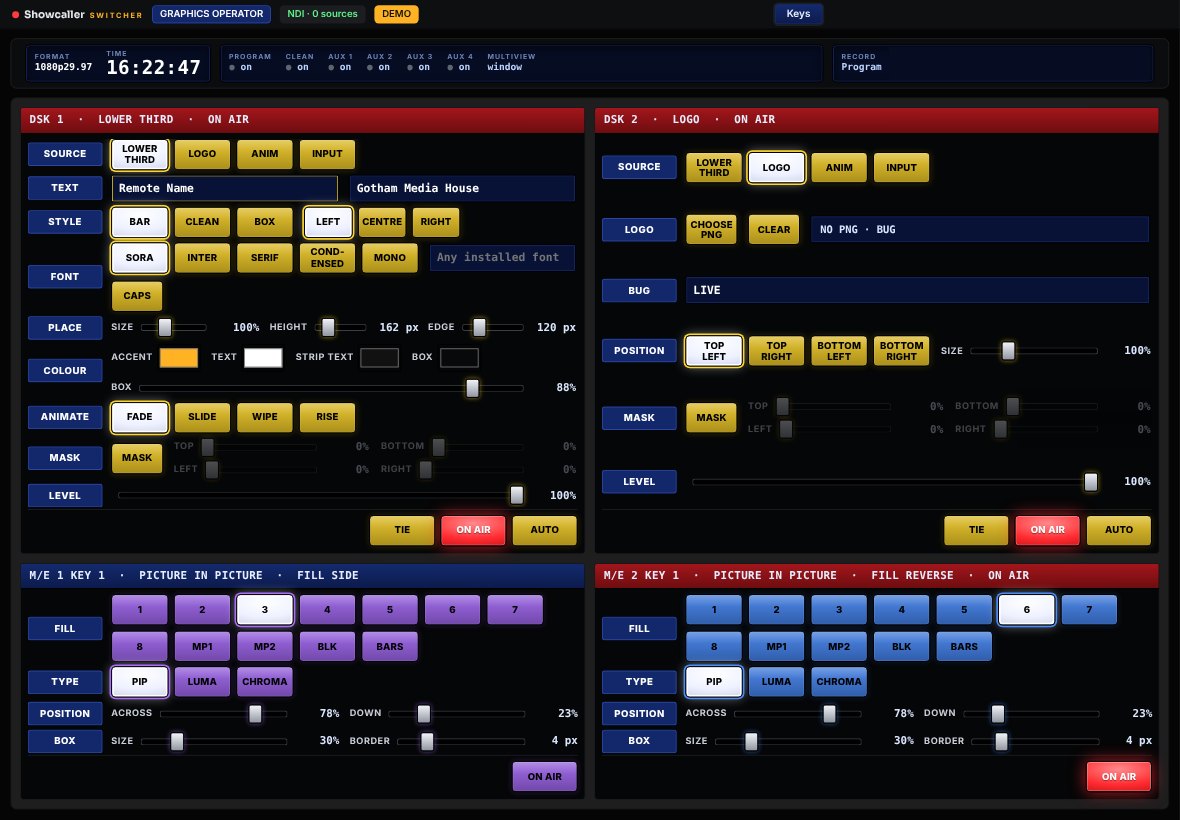
Each M/E has a key for picture in picture, luma or chroma (green screen). Two downstream keys take a lower third, a logo, any input, or an animation with transparency.

  • Lower thirds with your text, fonts, colours and a fade, slide, wipe or rise in
  • Animated WebM and GIF graphics; a MOV with alpha is converted for you
  • Masks, levels and TIE, ON AIR and AUTO on every key
The Keys page: a lower third and a logo on the two downstream keys, and picture in picture on both M/Es

Two media players.

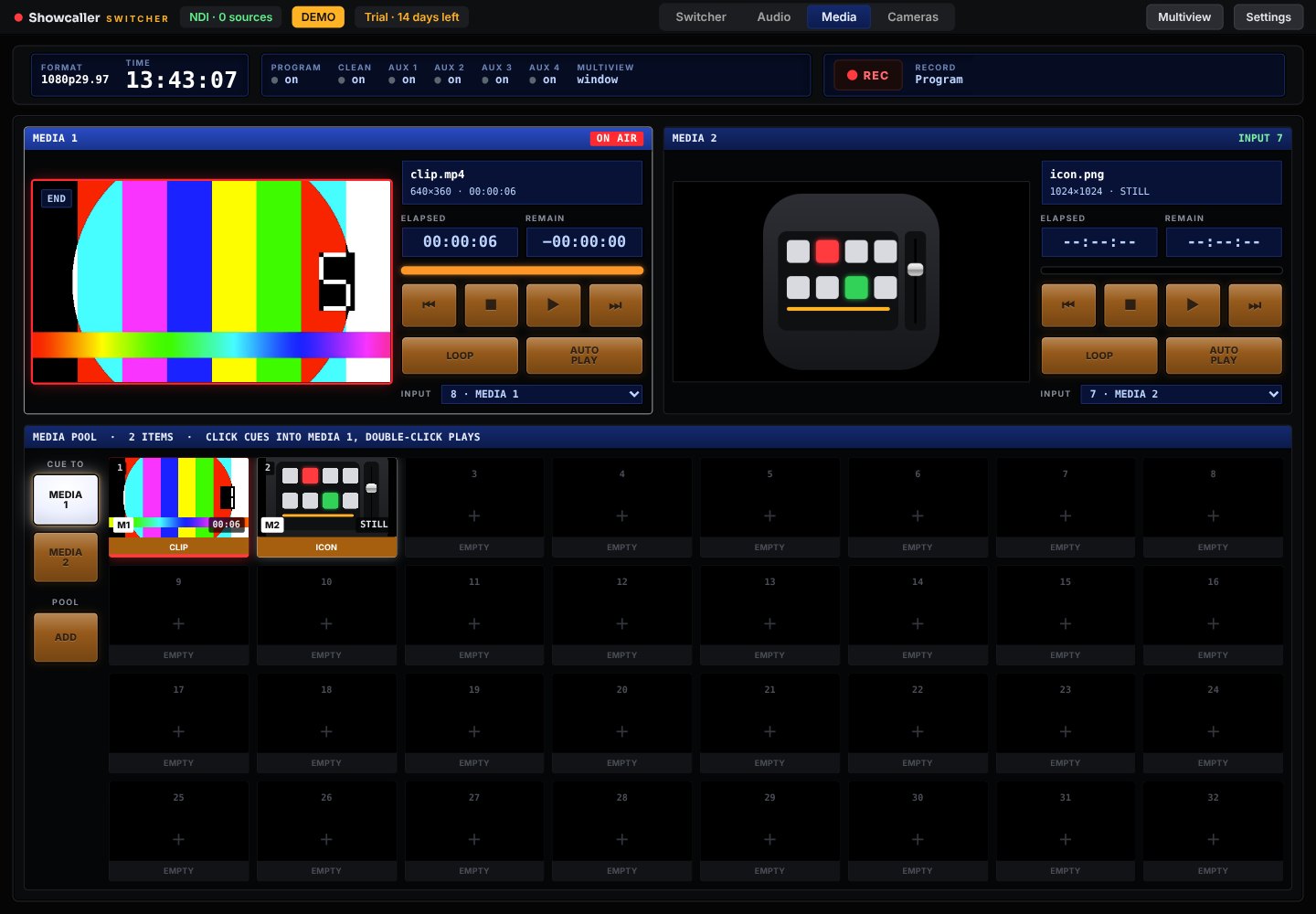
MP1 and MP2 are on every bus, so a clip, a sting or a holding slide is one button away. Load a pool of clips and stills, click one to cue it, and roll it from the panel.

  • Elapsed and remaining time, loop and auto play
  • Any input can also be a colour, a picture or a looping video
  • Cameras and capture cards plugged into the Mac work as inputs too
The Media page: a clip loaded in Media 1, a still in Media 2, and the media pool below

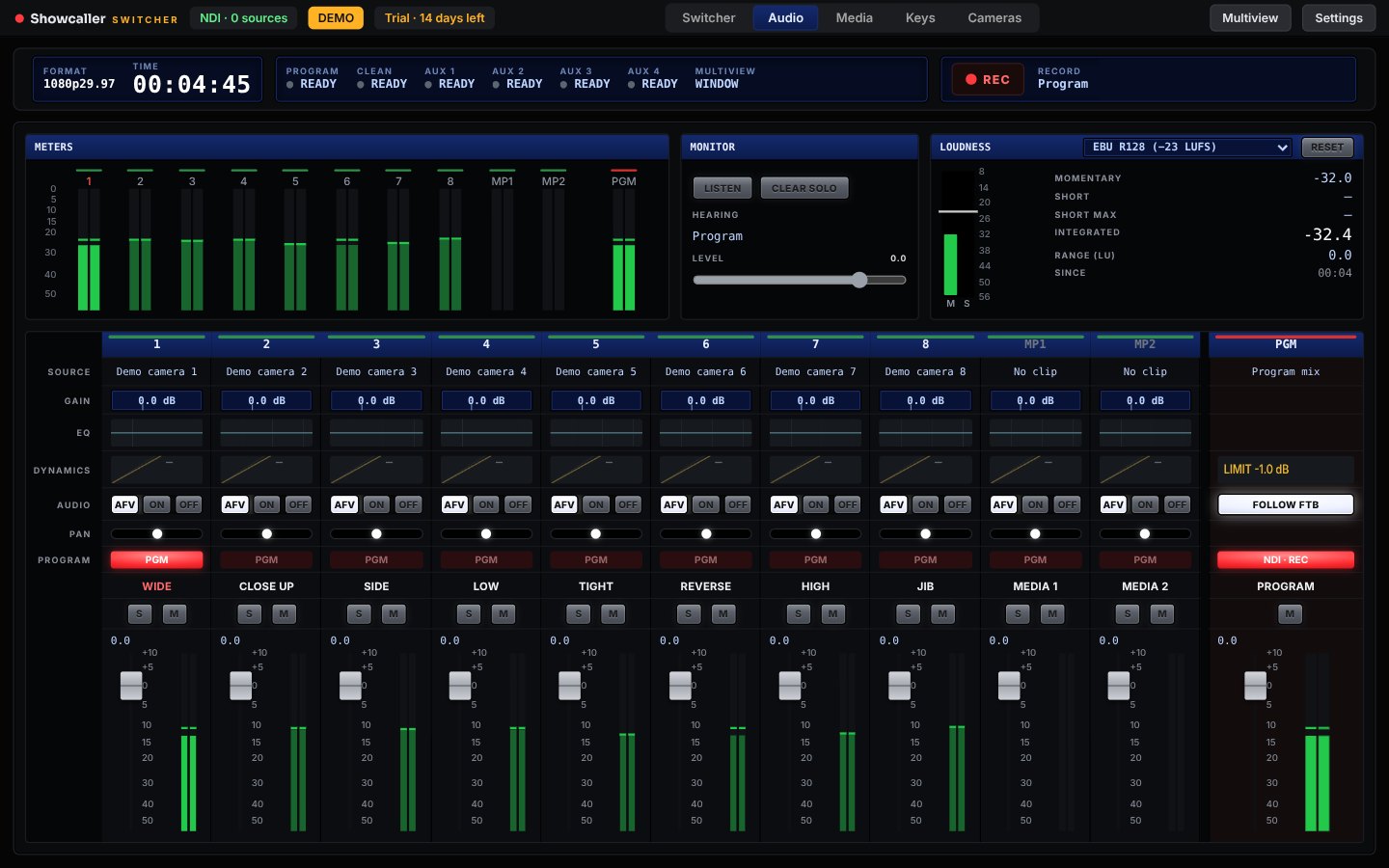
An audio mixer built in.

Every input and both media players get a channel strip. Sound follows the picture when you want it to, and program sound goes out with the NDI program feed and into the recording.

  • AFV, ON and OFF per channel, with gain and faders
  • EQ, gate, compressor and delay on each strip
  • Program limiter and EBU R128 loudness meter
  • Listen to any channel, and a master that can follow fade to black
The Audio page: meters, loudness, and a channel strip for each input with AFV, ON and OFF

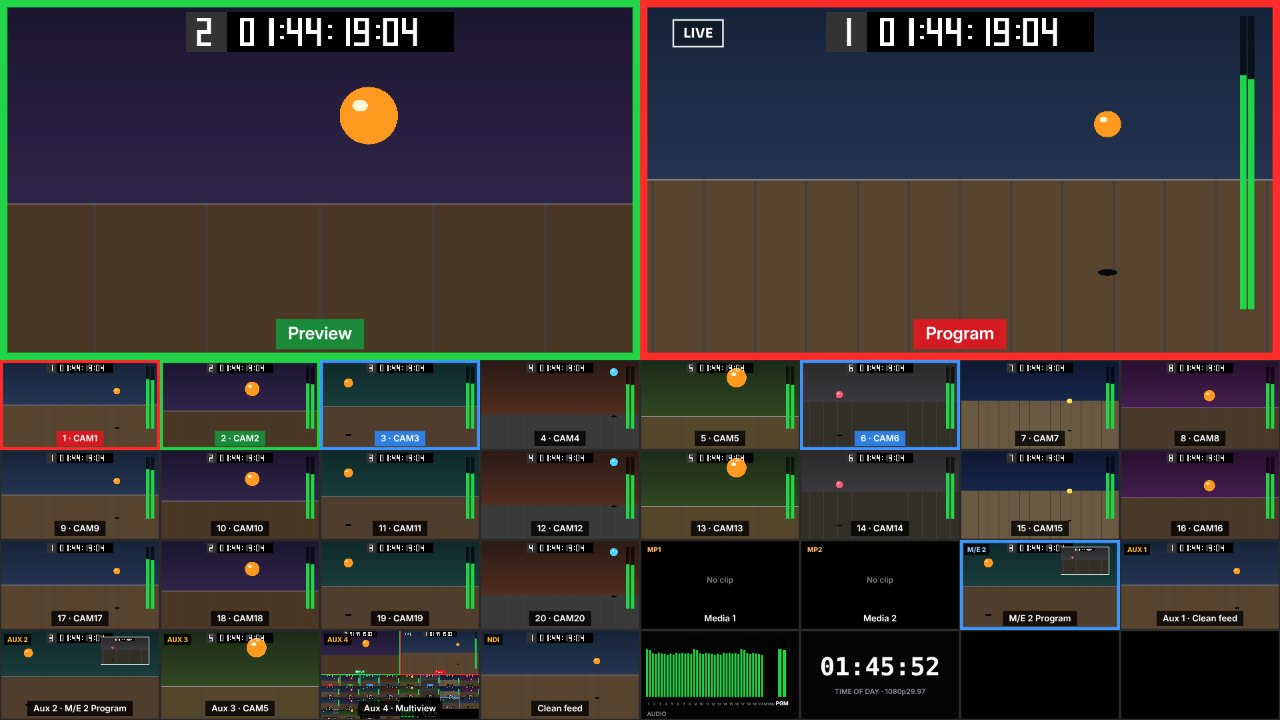
A multiview on the second screen.

Preview and program up top, every input below with names, tally and audio meters, plus the media players, M/E 2, the aux buses and a clock. Eight layouts to choose from.

  • Red and green tally on every box
  • Choose what goes in each box
  • Labels, meters and safe areas on or off
The multiview: preview and program at the top, then 20 cameras, the media players, aux buses and a clock

Record the show

One button records program or clean feed to a .mov in ProRes 422, ProRes LT or H.264, with sound and timecode.

NDI outputs

Program, clean feed and four aux outputs in 720p, 1080p or 4K at 25 to 60 fps, ready for a stream encoder, a recorder or another app.

PTZ cameras

A Cameras page with pan, tilt, zoom, focus and presets for PTZ cameras that take control over NDI.

Practice cameras

It starts with eight practice cameras, so you can learn the panel before any NDI gear is plugged in.

Keyboard shortcuts

1–8previewShift+number cutSpaceCUTEnterAUTOFfade to black⌘Rrecord

Works with the family

Send its NDI to Showcaller Screens for the set, watch it in Multiview, and run clips from Playback.

Control

Buttons you can press, and help from the crew.

Hardware panels.

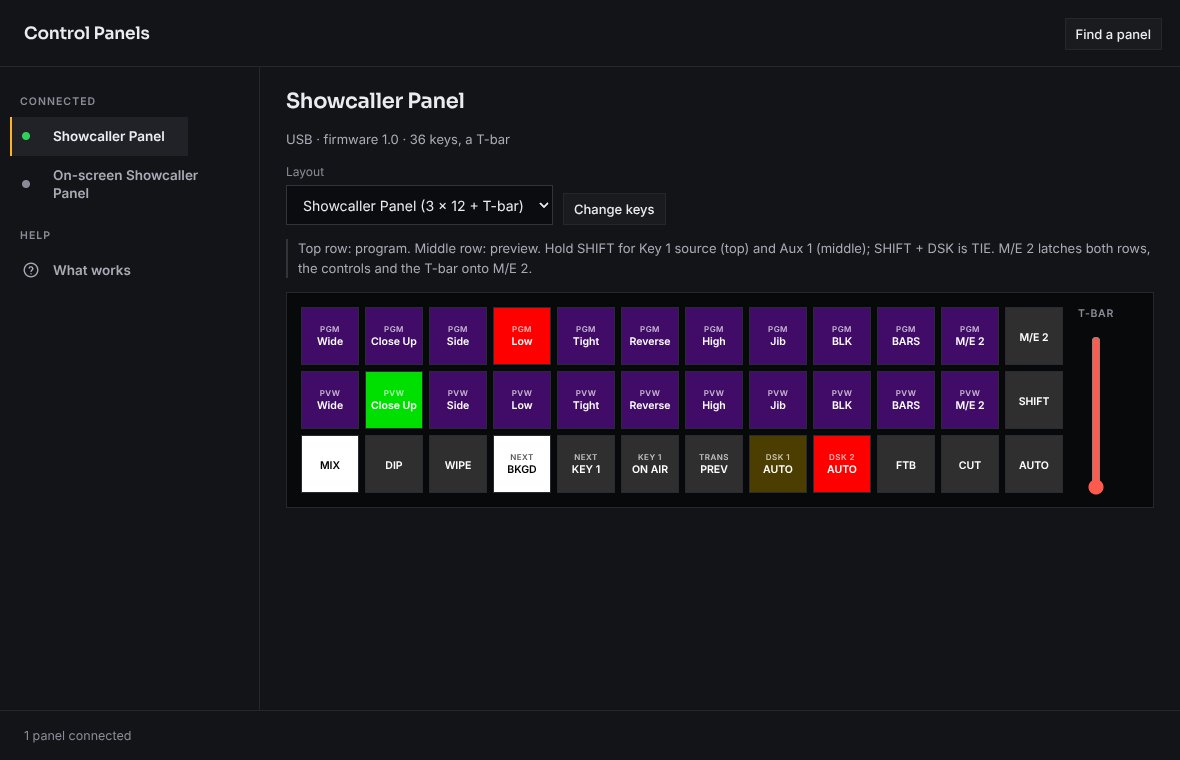
Plug in a panel and its buttons light up with names and tally. The switcher knows a few kinds out of the box, with layouts you can change.

  • Elgato Stream Deck
  • X-keys
  • MIDI controllers
  • The Showcaller Panel, our own panel with 36 lit keys and a T-bar Coming soon
The Control Panels window showing the Showcaller Panel layout: program, preview and transition rows and a T-bar

Operator links

Give the graphics, audio, media or camera operator their own link. It opens just their page in a browser on a laptop, iPad or phone on the same network.

Companion and Stream Deck

An HTTP control interface for Bitfocus Companion and other show control, off until you turn it on.

Everyone sees the same show

A change made on a panel, a link or the keyboard shows up everywhere at once, tally included.

License

Its own key, with a free trial.

14-day free trialEverything works for 14 days, no key needed.
A Switcher keySwitcher is licensed on its own. A Showcaller Screens key doesn't unlock it.
Without a keyAfter the trial the panel still works for practice, but the NDI outputs and recording are off.
Installed by Showcaller HubShowcaller Hub installs it, keeps it up to date and holds the key with your others.

Try the test build.

Showcaller Switcher is in testing on the Mac now, with Windows to follow. Tell us about your show and we'll send you a build to try.

Questions

Good to know.

What do I need to run it?

A Mac with macOS 12 or later, Apple silicon or Intel, and a second display if you want the multiview full screen (with one display it opens in a window). NDI cameras are optional; it comes with practice cameras. A Windows version is on the way.

Does it take SDI or HDMI?

Yes, through a capture card or a USB capture device the Mac can see. Outputs are NDI; to get SDI or HDMI out, send the NDI program to a converter or to Showcaller Screens.

Can I stream with it?

Send the NDI program feed, with sound, to your streaming software or encoder, such as OBS or vMix. The switcher records the show itself as well.

Which hardware panels work?

Elgato Stream Deck, X-keys and MIDI controllers, plus anything that can send commands through Bitfocus Companion. Our own Showcaller Panel, with lit keys and a T-bar, is coming soon. The panel support is new, so tell us what you have and we'll help set it up.

Is my Showcaller Screens license enough?

No. A Screens key covers Screens and the Pro features in Timer and Multiview. The Switcher has its own key, like Replay, ISO and Playback.

How much will it cost?

Pricing will be set when it's out of testing. Testers get the 14-day trial and can ask us about longer test keys.