ShowcallerStudio Book a demo
Screen playback for sets and stages

Every screen on your set, run from one page.

Showcaller Studio puts video, stills, live cameras, web pages and graphics on set monitors, LED walls and projectors. One computer drives the screens. The crew runs them from a laptop, tablet or phone.

Showcaller Studio · Morning Live
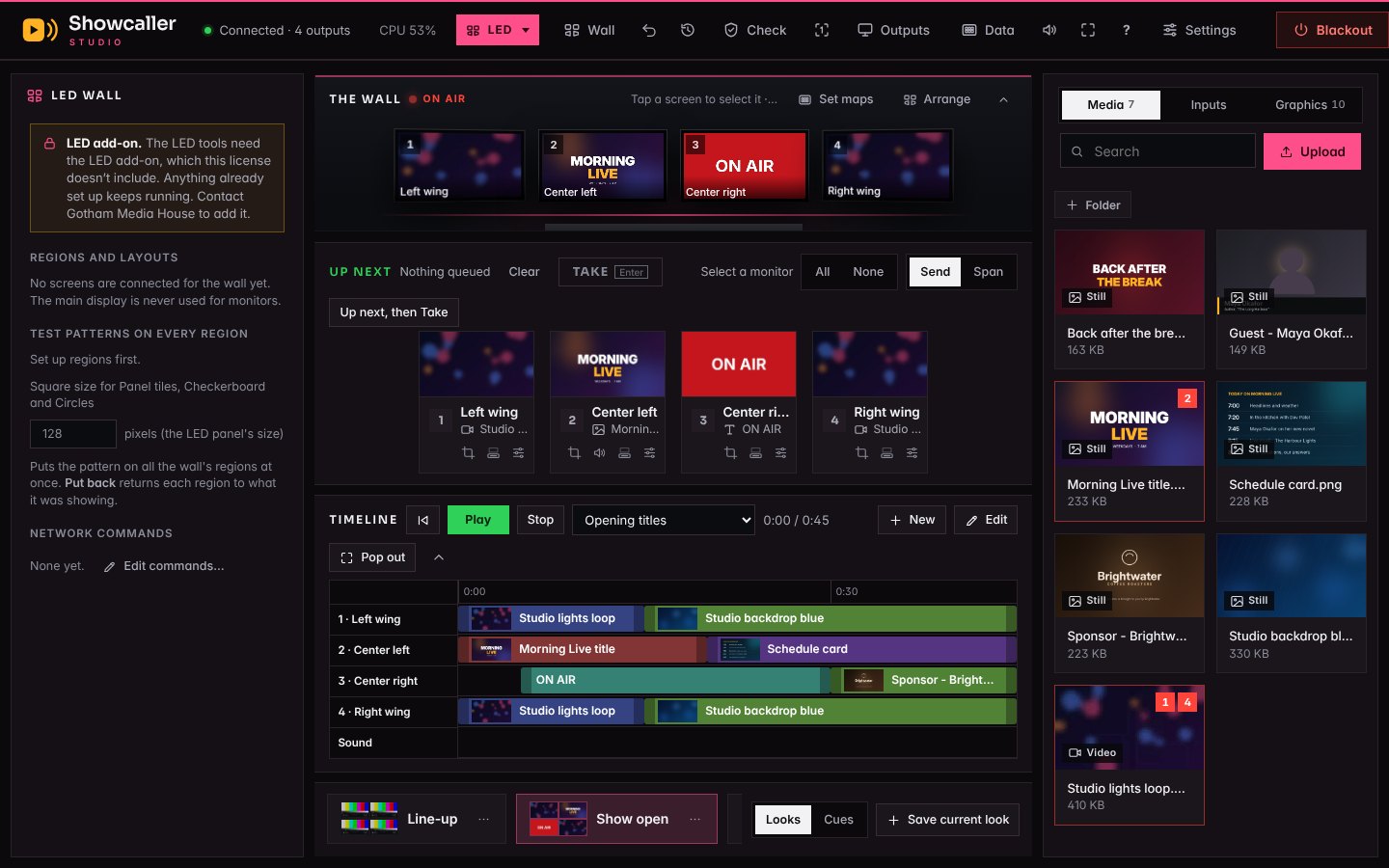
The control page, recorded in real time from the current app: recall two looks, send a still to one monitor, then step through the cue list with GO.
On the set · four monitors
What the set shows at the same moment. The four pictures were recorded from Showcaller Studio’s own monitor outputs during the run-through above and placed on a drawn set. “Morning Live” is a made-up show.
Windows and MacOne set computer drives every screen
Your own networkNo cloud service in between
Stream Deck, OSC, MIDIButtons and show control
ATEM, vMix, OBSLooks can follow the switcher
What it runs

Five kinds of show, one app

Pick what you're running when Showcaller Studio opens. Each kind has its own look and its own tools, and the ones you don't need stay out of the way. Switch any time with Alt+1 to 5.

Features

Built on a working set, for the people who run one

Save the whole set as a look. Run the show with GO.

A look remembers what every monitor is showing and recalls it in one tap. Put looks in running order and step through them with GO or the space bar.

  • A fade time for each cue
  • Cues that follow on by themselves, after a wait or when a video ends
  • Music and stings that start and stop with a cue
  • Notes beside GO so you know what's next
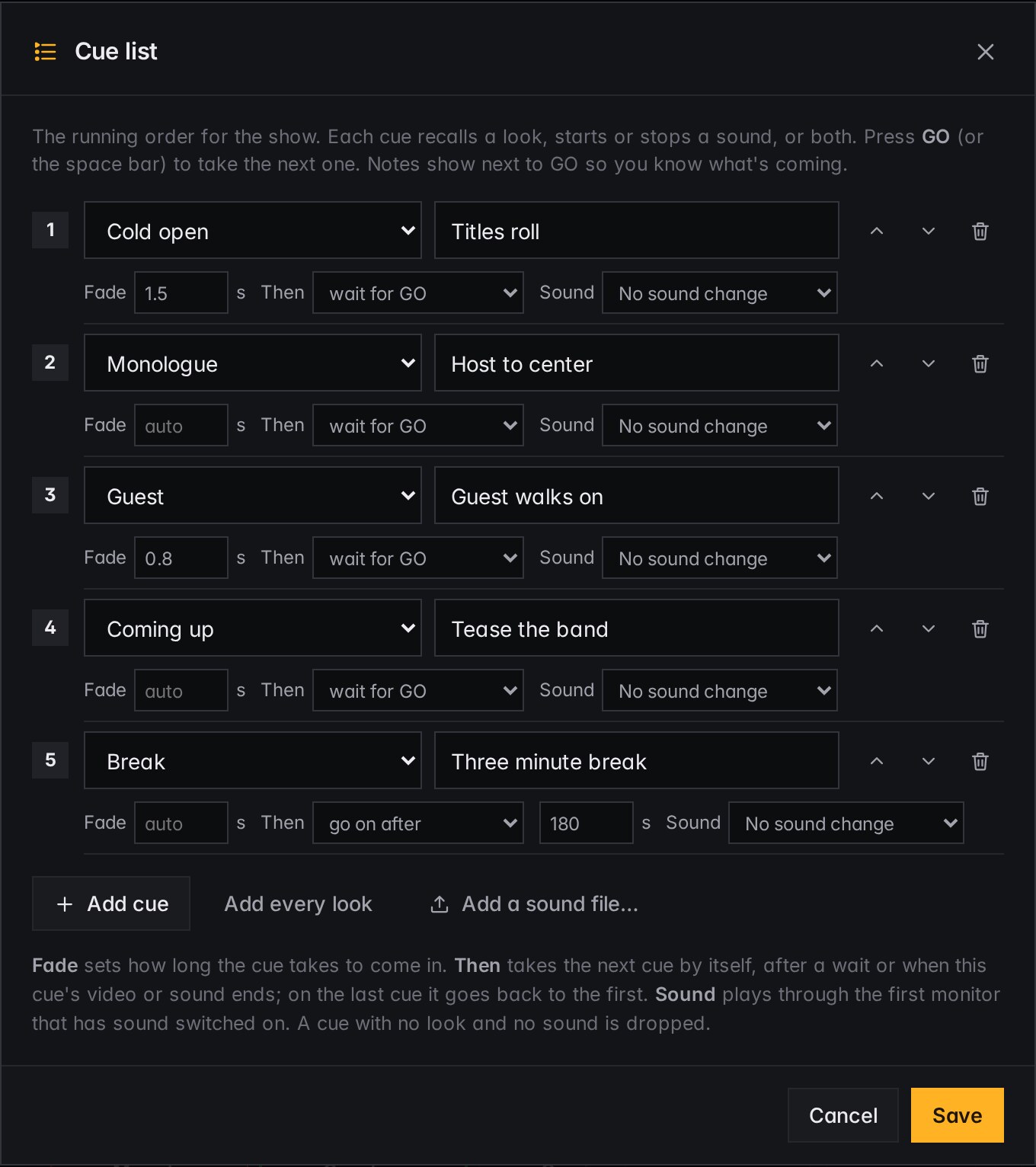
The cue list editor: five cues with fade times, follow-on settings and sound

One picture across many screens

Span a video or still across monitors, LED regions or projection surfaces. Each screen shows its own part, and the same video stays in step on every one.

  • The set drawn at its true proportions
  • Gaps between TVs accounted for
  • Works across linked computers
An LED screens project: one backdrop spanned across three regions of a wall

Run it from anywhere in the building

The control page opens on any laptop, tablet or phone on your network. Nothing to install on the crew's devices.

  • An operator PIN for running the show, an admin PIN for settings
  • A view-only link for producers and clients
  • A simple phone remote with big buttons for looks, GO and Blackout
  • Remote access over Tailscale, never an open port
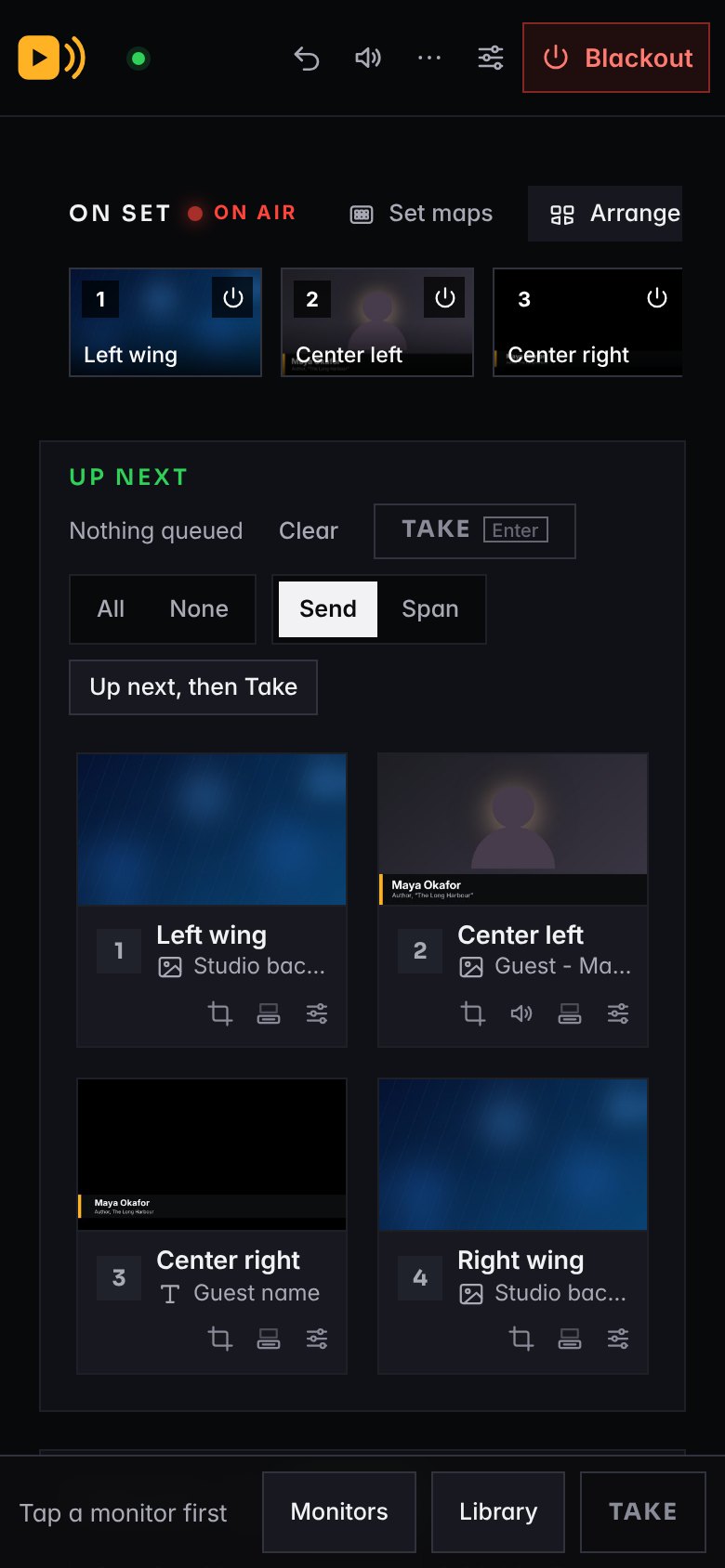
The control page on a phone

Anything on any screen

Video, stills, playlists, cameras and capture cards, app windows, web pages, clocks, countdowns and text.

Works with your control room

Stream Deck through Companion, OSC and MIDI. Follow settings for ATEM, vMix, OBS and tally recall a look when the program source changes.

Made for live

A pre-show check, undo, a Blackout key that works from any window, automatic recovery when a source drops, alerts on your phone, daily backups and updates you can roll back.

Sound where you want it

Choose the sound output per monitor, set levels and lip-sync delay, and watch meters on the page or on a monitor.

Show files

Each production keeps its own sources, looks, cues and schedule. Switch shows without rebuilding the set.

Graphics from a spreadsheet

Point a lower third at a Google Sheet or paste a table. Names and titles fill in, and Next row moves the whole show on.

A timeline

Lay pictures on a track for each monitor and press Play, for a timed open or a walk-in loop that runs itself.

Locked down

Signed updates only, PINs with lockouts, a code on screen before a new computer can join, and one button to sign out a lost phone.

Bigger sets

Link a second computer and its screens join the same set, numbered and controlled from the same page.

Getting started

Up and running in an afternoon

STEP 1

Install on the set computer

Plug in the screens. Showcaller Studio finds them and never touches the computer's own display.

STEP 2

Add media and build looks

Drag files in, send them to monitors, and save each arrangement as a look.

STEP 3

Run the show

From the control page, a Stream Deck, your switcher, or a schedule.

Pricing

One price per set computer

Billed yearly. Every license includes updates and support for the year, and drives as many screens as the computer can.

Showcaller Studio

$590per computer, per year

Monitors, Signage and Multiviewer shows, and everything under Features.

  • All source types, looks and cues
  • Span, set maps and TV walls
  • Stream Deck, OSC, MIDI, switcher follow
  • Playlists and the schedule

LED add-on

+$390per computer, per year

For LED walls fed from a processor.

  • Regions from an imported pixel map
  • Turned panels, wall trim, wall layouts
  • 28 test patterns, still and moving
  • Network commands, including Art-Net

Projection add-on

+$390per computer, per year

For projectors on set pieces and objects.

  • Corner pin, mesh warp and masks
  • Several surfaces from one projector
  • Real-size layout, so circles stay round
  • Unfolded template and a sample video

Everything SAVE $180

$1,190per computer, per year

Showcaller Studio with both add-ons, for studios that do it all.

  • Monitors, LED, Projection, Signage and Multiviewer
  • Every tool on this page
  • One key, one renewal date

Work out your price

Set computers 1
Your price per year $590 Showcaller Studio on 1 computer

Prices in US dollars. A linked second computer needs its own license. Installation and on-site setup by Gotham Media House are quoted separately.

Questions

Good to know

What do I need to run it?

A Windows PC or a Mac with a video output for each screen. The computer's own display is kept for the operator and never used as a monitor.

Does it need the internet?

No. It runs on your computer and your network. Web sources and phone alerts need a connection; everything else works offline.

What happens if my license runs out during a show?

The show carries on. Showcaller Studio never takes a picture off a monitor over licensing; it reminds you on the control page until you renew.

Can I try it first?

Yes. Every copy has a demo for each kind of show, with sample media, and we'll walk you through it on a call.

Can I add LED or Projection later?

Yes. An add-on is a new key for the same computer. Nothing is reinstalled and your shows stay as they are.

Who makes it?

Gotham Media House, a video production company with 20 years in broadcast. Showcaller Studio was built to run our own studio sets, then offered to other studios.

See it on your own screens.

Tell us what's on your set and we'll show you how Showcaller Studio would run it.