ShowcallerIntercom Try the test build
In testing · From Showcaller Studio

Comms for the whole show.

Showcaller Intercom is crew talkback in software. For a small show or a crew out in the field, one Mac running Intercom Remote is the whole system. For a control room, the Frame sits in the rack, every position gets a panel, and crew join from their phones, in the building or anywhere else.

Showcaller Intercom Panel
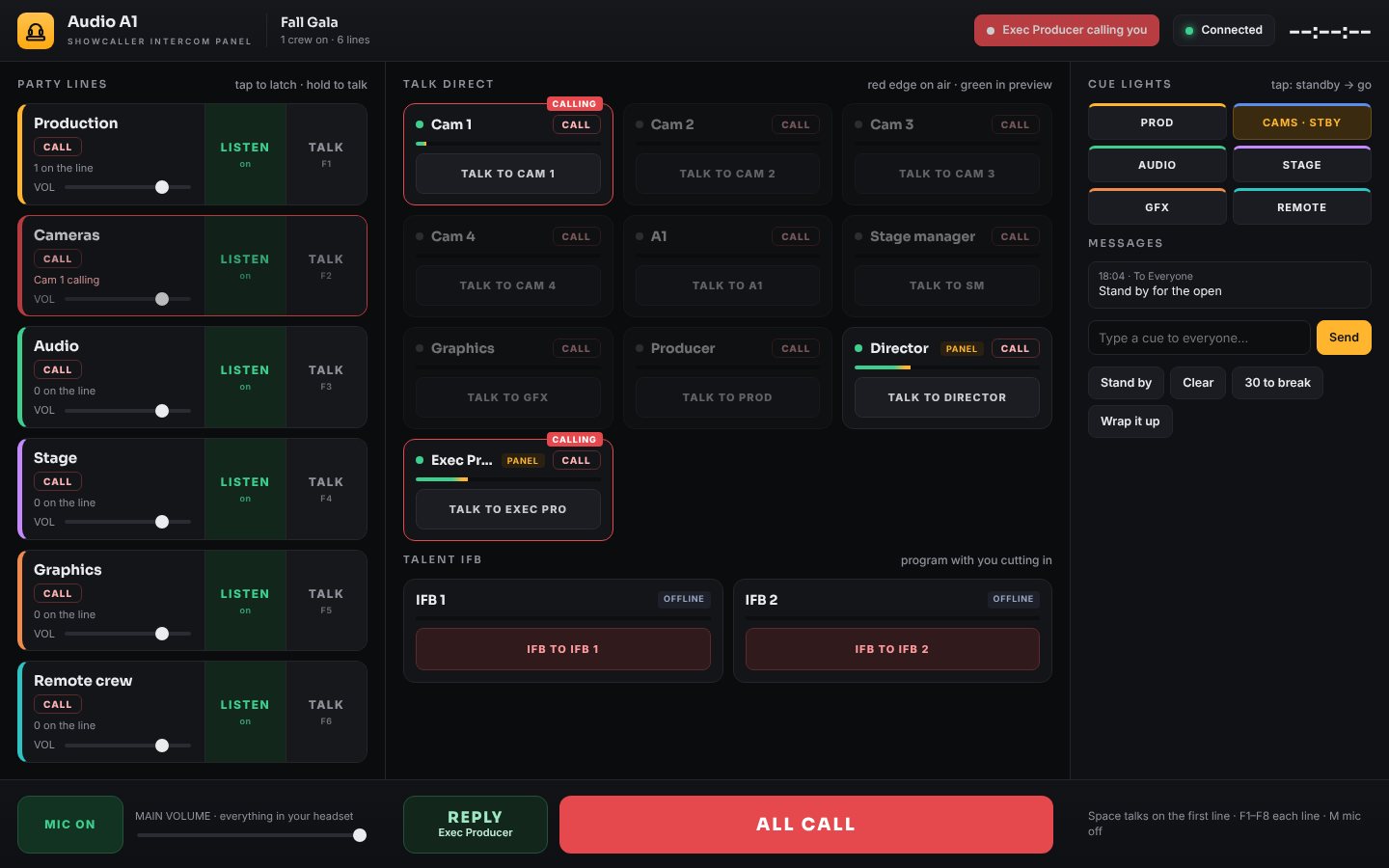
A control-room panel with the Exec Producer calling: party lines with CALL, LISTEN, TALK and volume on the left, TALK and CALL keys for each person in the middle with talent IFBs below, cue lights and text cues on the right, and REPLY next to ALL CALL
Party lines and IFBCalls, Reply, cue lights, cues, tally
A panel per positionInstall, type the code, pick your seat
Crew on any phoneA link, a QR code or a phone call
Remote free for 4 crewA key unlocks the Frame and the whole crew
Two setups

One Mac, or a full control room.

Both run the same lines, the same crew pages and the same apps. Start small and move up to the Frame when the show grows.

Intercom RemoteOne Mac for a small show or a field crew, on its own or linked to the Frame
Intercom FrameThe system in the rack that everything connects to
Intercom CommsThe comms engineer's app, in the control room
Intercom PanelA panel at every other position
Small shows and field crews

Showcaller Intercom Remote

One Mac is the base station and the director's panel. Put on a headset, send each person their link and you're on comms. Right for a stream, a church service or a one-camera shoot, or take it out with a remote crew and link it back to the studio Frame.

  • The director talks from the Mac, or from an iPad
  • Settings and the director's keys on one screen
  • Crew on phones, talent on IFB, a 4-wire port to the house system
  • Link it to the studio Frame and the field crew joins the show's lines
Control rooms

Showcaller Intercom Frame

The Frame runs on a computer in the rack, with no one sitting at it. Everything connects to it: panels in the control room, crew on the floor, ports to other intercoms. The comms engineer runs it all from the Comms app in the control room.

  • Up to 32 panel positions: Director, Producer, Audio, Graphics and more
  • An overview of everyone connected, live, with an event log
  • Shows and templates, recording, and a backup Frame
Showcaller Intercom Frame

The frame in the rack.

Everything connected, on one page.

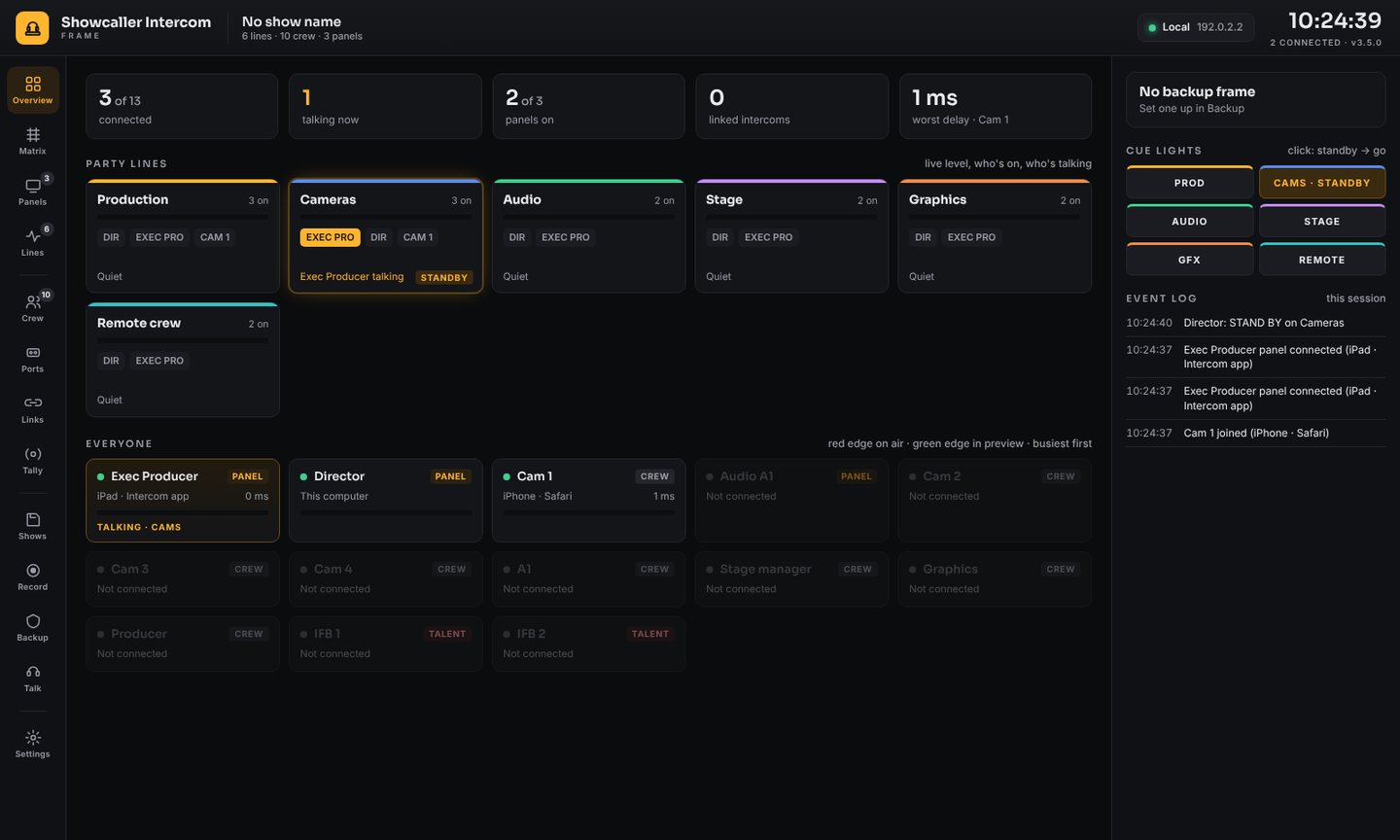
Panels, phones, ports and linked intercoms all connect to the Frame. Its overview shows every party line with who's on it and who's talking, a tile for everyone with their tally, the cue lights, the backup and the event log.

  • How many are connected, talking now and the worst delay
  • Red edge on air, green edge in preview, busiest first
  • An event log of who joined and left, saved for each day
  • The Frame doesn't open its own microphone unless you ask it to
The Frame's overview: counts across the top, a card for each party line showing who is on it and who is talking, a tile for everyone below, and the backup status, cue lights and event log on the right

Who hears what, in one matrix.

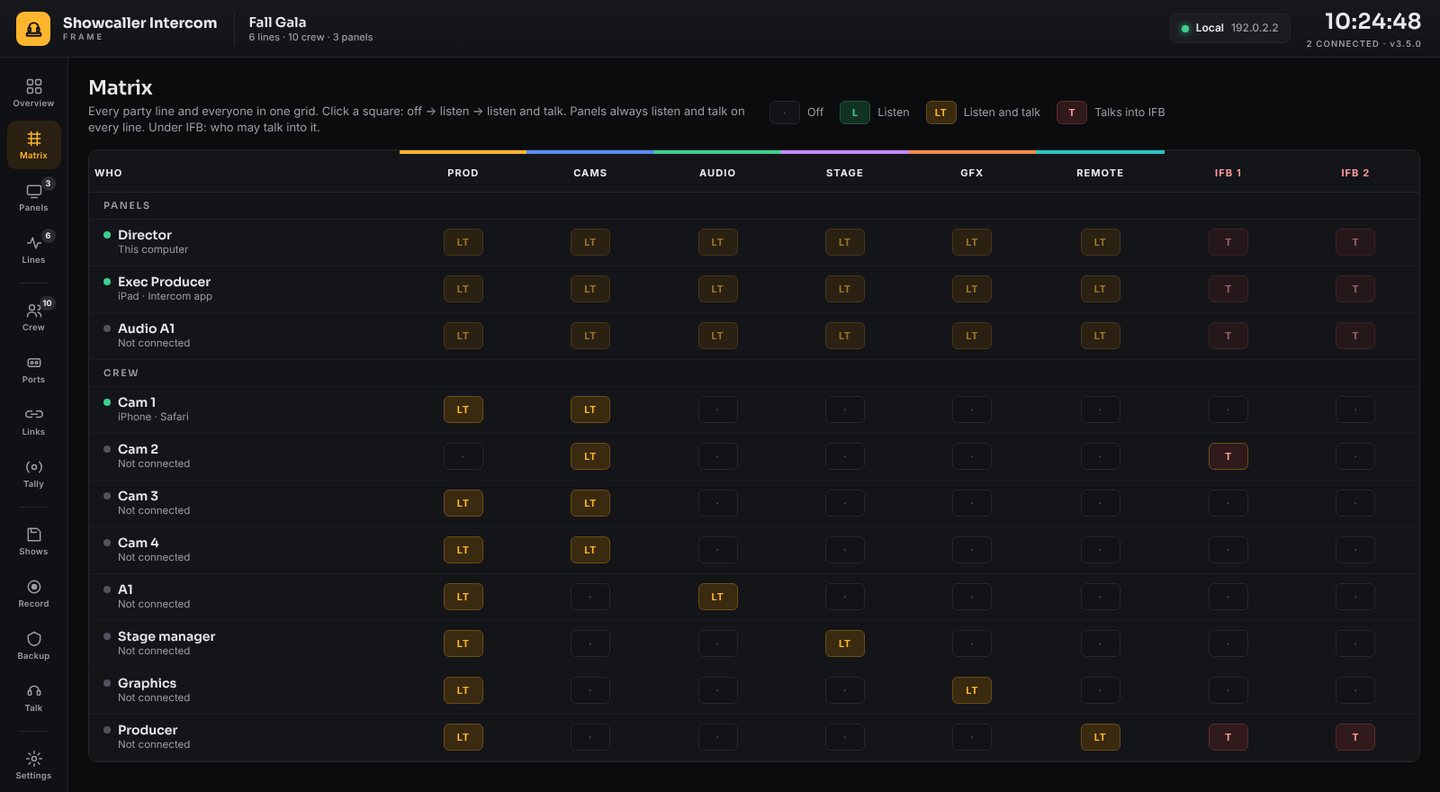
Every party line across the top, every panel and crew member down the side. Click a crosspoint to go from off to listen to listen and talk, and choose who can talk into each IFB.

  • Panels get every line, unless Comms gives a position fewer
  • Crew get just the lines they need
  • IFB columns set who can talk to each presenter
The Frame's matrix: party lines and IFBs across the top, panels and crew down the side, with off, listen, listen and talk, and talks into IFB crosspoints

Shows and templates

Save the whole setup as a show and load it next time, with everyone's links kept. Start from a template, or export a show file to another Frame.

Recording

Records each party line to its own file, plus one file of everything, as 48 kHz WAV files that start together. The event log goes beside them.

Backup Frame

A second computer keeps a copy of the show and takes over within seconds if the main Frame stops. Crew pages move across on their own and move back when it returns.

The Director is a position

Rename the Director, or remove it on a show that doesn't need one. Every seat in the control room is just a position on the Frame.

Linked intercoms

Link a field crew's Intercom Remote to the Frame and, if it allows it, change its show name, lines and crew from the Frame while it carries on running on its own Mac.

One show per Frame

Each Frame runs one show. Running two shows at once? Run two Frames.

Showcaller Intercom Comms

The comms engineer's app.

Run the whole system from the control room.

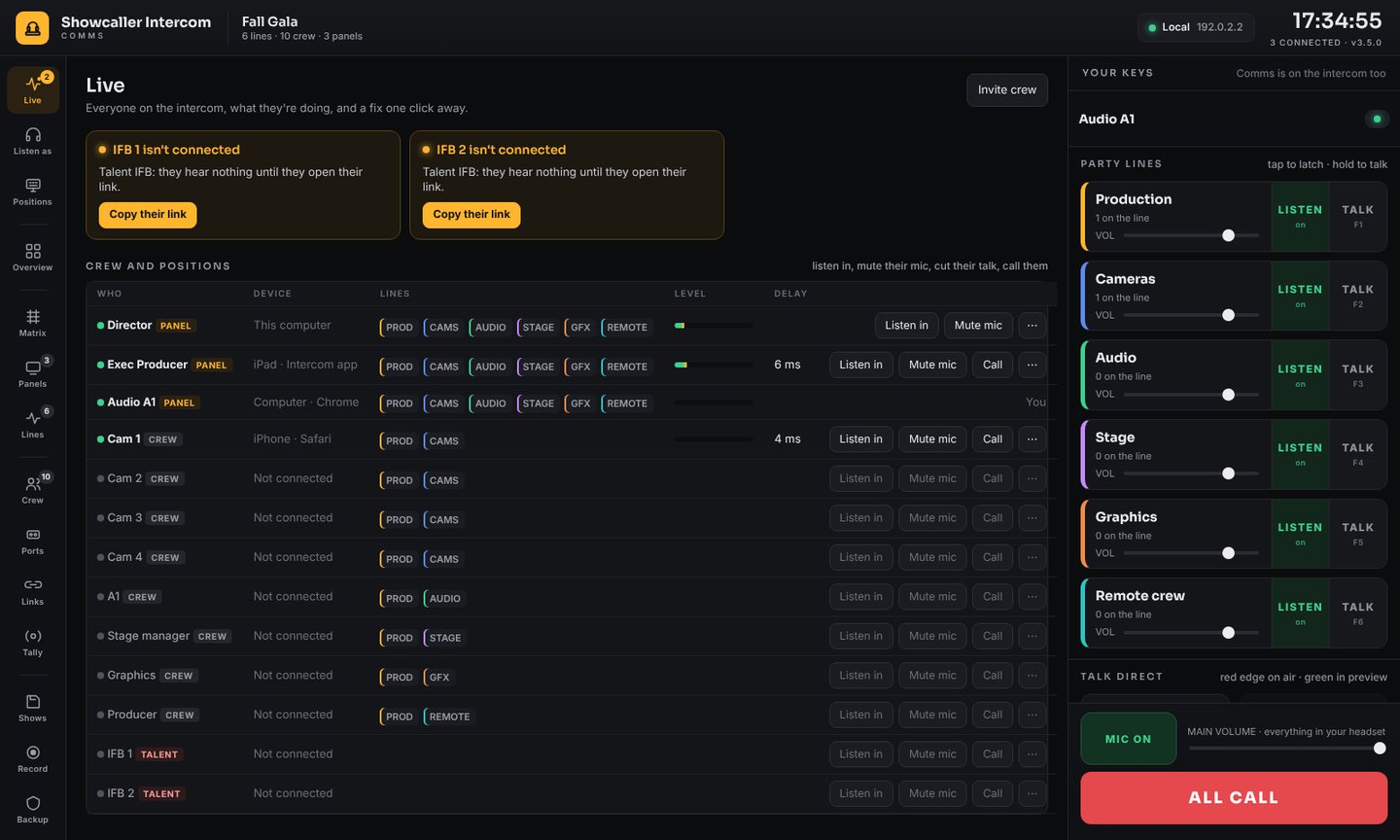
Showcaller Intercom Comms joins the Frame as the Comms position and opens every Frame page from the control room, with your own key panel docked beside them. No one has to walk to the rack.

  • Live: alerts for anything wrong, with the fix one click away
  • Listen in, mute someone's mic, cut their talk or call them
  • Invite crew, copy a link, show a QR code or disconnect anyone
  • Lines, crew, ports and tally each on their own page
  • Calls from every panel and crew member, in one list
The Comms app's Live page: alerts for two IFBs that aren't connected with Copy their link buttons, a table of every crew member and position with their lines, level, delay and Listen in, Mute mic and Call buttons, and the comms engineer's own key panel docked on the right

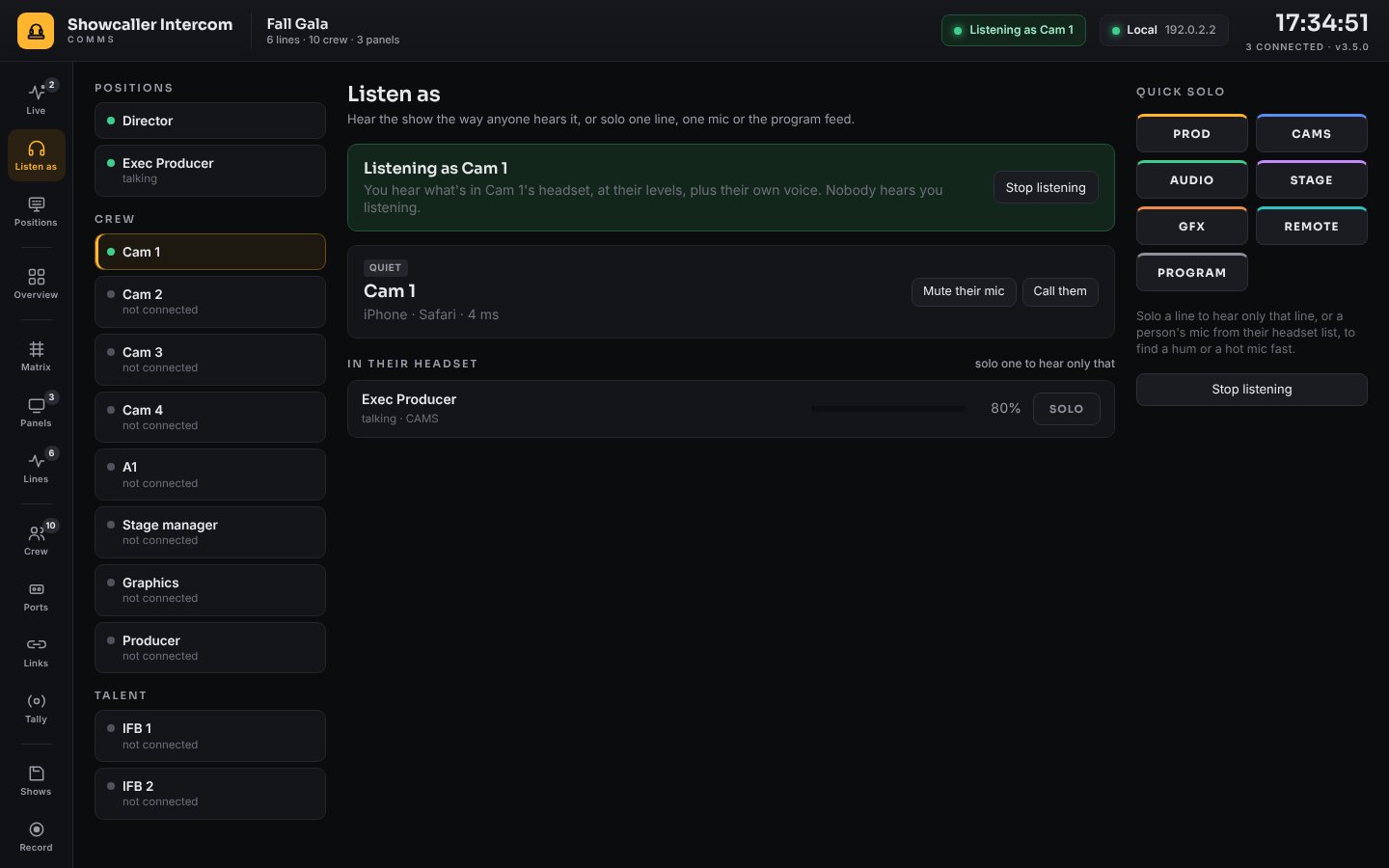
Hear the show the way they hear it.

Listen as anyone: hear exactly what's in a camera operator's headset, at their levels, plus their own voice. Or solo one line, one mic or the program feed to find a hum or a hot mic fast.

  • Nobody hears you listening
  • See what's in their headset and at what level
  • Positions: choose each panel's lines, and whether it can ALL CALL, talk into IFBs, send cue lights, message everyone or hear program
Listen as: the Comms app listening as Cam 1, showing what is in Cam 1's headset with a level and solo button, and quick solo buttons for each line and program
Showcaller Intercom Panel

A panel for every position.

Install it, then pick your seat.

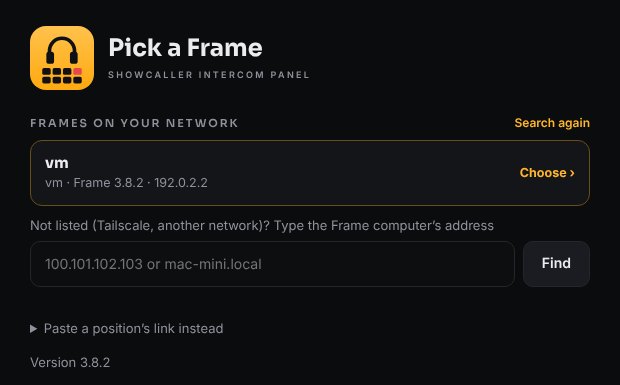
Showcaller Intercom Panel is a small app for each control-room computer. It lists the Frames on the network; choose one, type its six-digit code and pick the position, and that computer is the Director's panel, or Audio's, or Graphics'.

  • The code is on the Frame's Panels page; make a new one any time
  • Over Tailscale or another network, type the Frame's address instead
  • See which positions are free before you pick one
  • The Comms app does the same for the Comms position
  • Recent positions open again with one click, and the app tells you if a position was removed
  • Or paste a position's link, or open it on an iPad with the Intercom app
The Panel app's Pick a Frame page: the Frames found on the network with a Choose button, a box to type a Frame's address for Tailscale or another network, and a link to paste a position's link instead

Every line and every person, one key away.

A panel shows the party lines with CALL, LISTEN, TALK and volume, a TALK and CALL key for each person and each other panel, the talent IFBs, cue lights and text cues. Lit edges show who's on air and who's in preview.

  • Tap a key to latch it, hold it to talk while it's down
  • Hold CALL to flash a line or a person, the way a hardware panel does
  • Whoever called you or talked to you last is on REPLY
  • ALL CALL to talk to everyone at once
  • F1 to F8 for each line, Space for the first, M for mic off
  • Panels talk and listen; only Comms changes settings or invites crew
A panel with party lines, TALK keys for crew and other panels, talent IFBs, cue lights and messages

On a small show, the Mac is the panel.

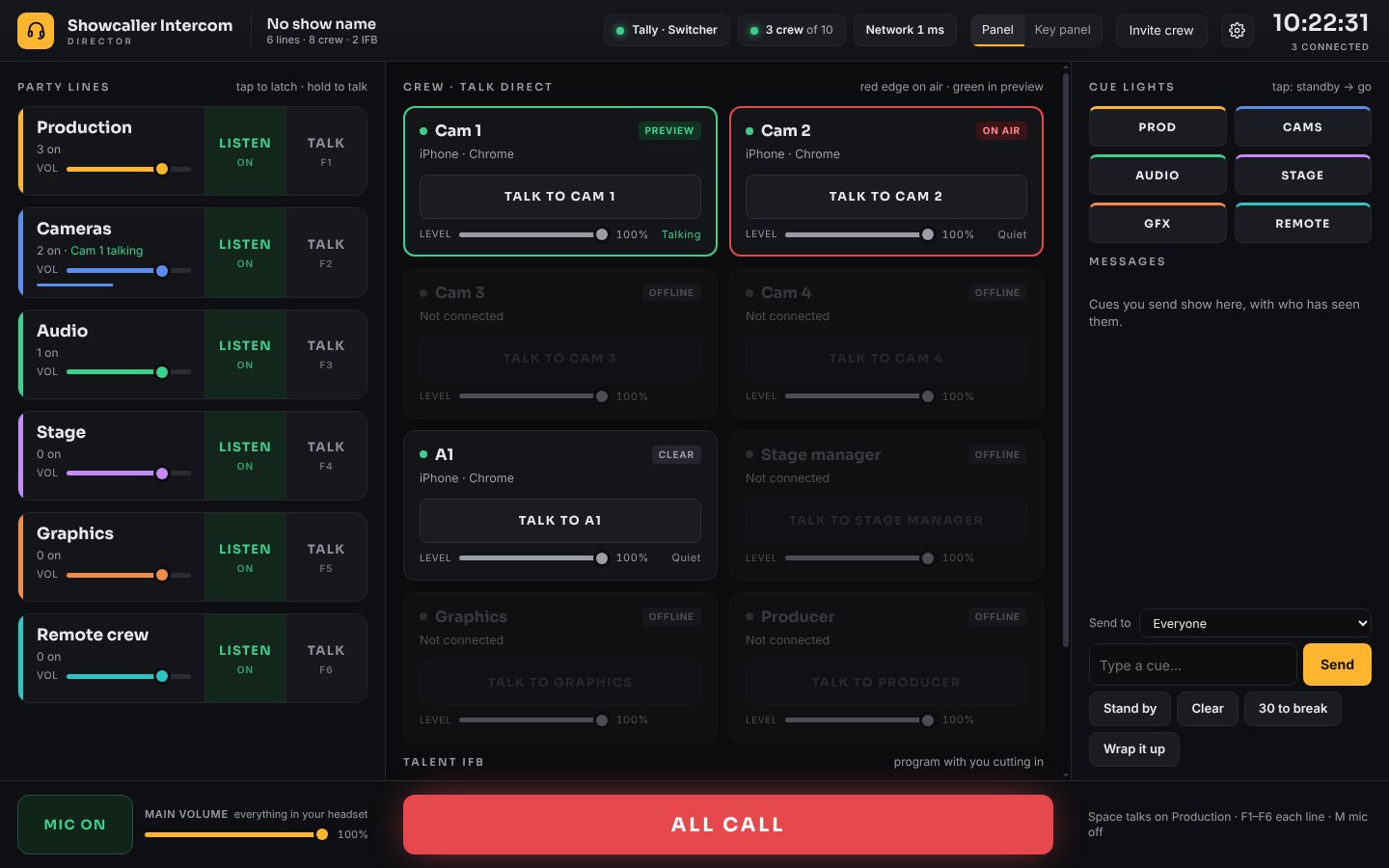
Running Intercom Remote on one Mac, the director's panel is right there in the app: every line, a card for each person with their tally and level, cue lights and text cues. Switch it to a hardware-style key panel when you'd rather have keys than cards.

  • Tally from Switcher, crew count and network delay in the header
  • Key panel: 16 keys per page with a label, TALK and level on each
  • Arrange keys, hide the ones you don't use, add pages
Intercom Remote's director panel on one Mac: party lines on the left, a card for each crew member with tally, level and a TALK key in the middle, cue lights and text cues on the right, and ALL CALL along the bottom

IFB for talent

Talent hear the program feed, which dips when someone talks to them. Mix-minus means no one hears their own voice back. Choose who can talk into each IFB.

Cue lights

STANDBY and GO for each line, shown full width on every crew screen.

Text cues

Send a line of text to one person or everyone, with ready-made cues like "30 to break", and see when they've read it.

Tally from Switcher

Linked to Showcaller Switcher, the camera on air shows red and the one in preview green, on the panels and on the operator's phone.

Levels per person

Set how loud each line and each person is in the director's headset, with sidetone for anyone who likes to hear themselves.

IFB test loop

A built-in loop of music and a voice, for checking every earpiece before doors.

Your crew

Any phone becomes a beltpack.

A link, a pair of earbuds, and they're on.

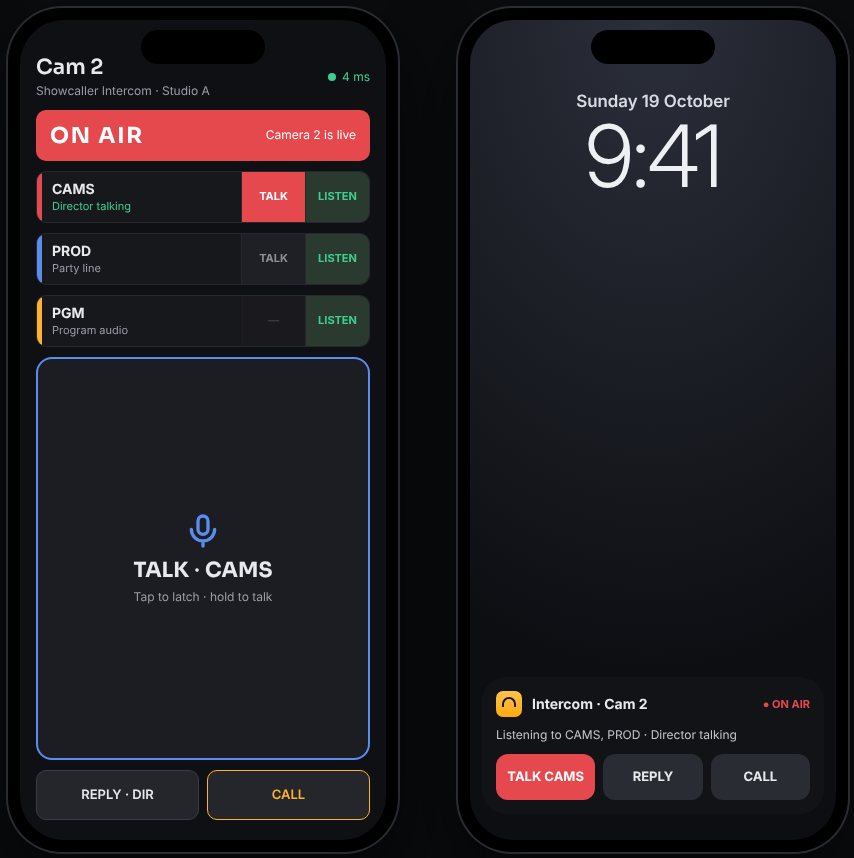
Each crew member gets their own link or QR code. They open it in the phone's browser, put in earbuds and they're on comms. No accounts and nothing to install.

  • Choose which lines each person talks and listens on
  • A switcher input per camera operator for their tally
  • Tap TALK to latch, hold it to talk while it's down
  • Calls flash on their screen, with Reply to answer whoever called
Two iPhones: a camera operator's crew page with ON AIR tally, lines and a big TALK key, and the lock screen with TALK, REPLY and CALL

Crew from anywhere.

Turn on From anywhere and every crew link works over the internet through showcallerstudio.com, with no VPN and no ports to open. A graphics operator at home or a presenter at another venue sits on the same lines as the crew in the room.

  • The Mac or Frame connects out, so nothing on your network changes
  • Keys are still checked by your own Mac or Frame
  • Panels and Comms work on the show network or over Tailscale
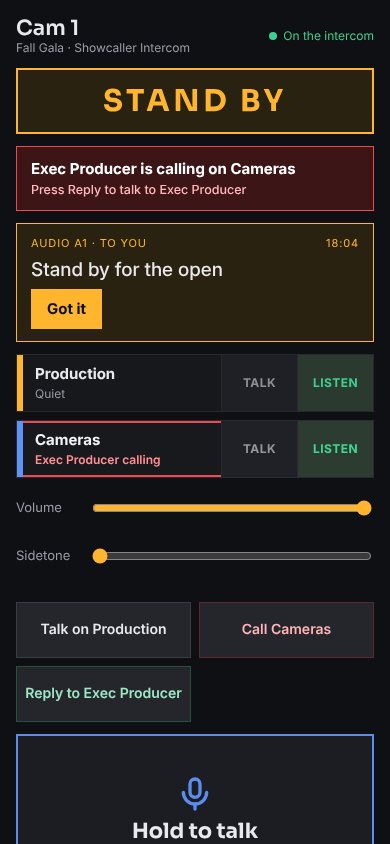
A camera operator's crew page on a phone: a STAND BY cue light, the Exec Producer calling on Cameras, a text cue to acknowledge, the lines with TALK and LISTEN, Call Cameras and Reply to Exec Producer buttons, and a big Hold to talk key

A free iPhone and iPad app. Coming soon

For crew who live on comms all day, the app adds what a web page can't: it keeps talking with the screen locked, with TALK, REPLY and CALL on the lock screen. It's in testing now and will be free on the App Store.

  • The iPad becomes a key panel: TALK, LISTEN and volume on every key
  • Open a panel position on an iPad, or run comms as director from one
  • Talent get program on and off and ear volume on the lock screen
  • Scan your QR code once and the app remembers the show
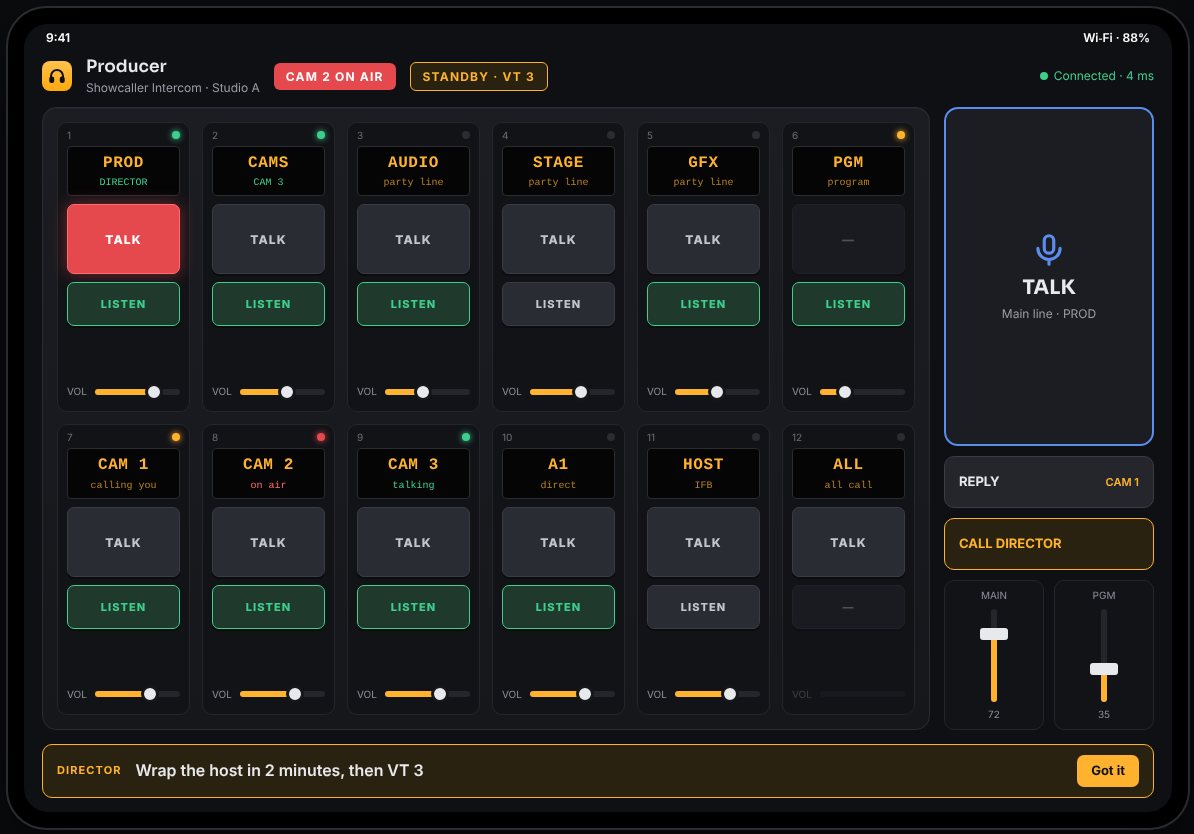
The iPad app as a key panel: 12 keys with labels, TALK, LISTEN and volume, a big TALK key, REPLY, CALL DIRECTOR and faders
Connect

Works with the comms you already have.

Phone lines, for anyone with a phone.

Add a phone line and anyone can dial a phone number into a party line. Or add a phone IFB, and a presenter on the phone hears the program feed and whoever talks to them. It answers by itself, and it can call out too.

  • Uses a SIP account that works over WebSocket, from SignalWire or your own FreePBX or Asterisk system with a WebRTC extension
  • Choose the lines it talks on and sends out, and voice-activated talk
  • One call per phone line; add more lines for more callers
  • The caller shows on Live, and the password never leaves the computer running the intercom
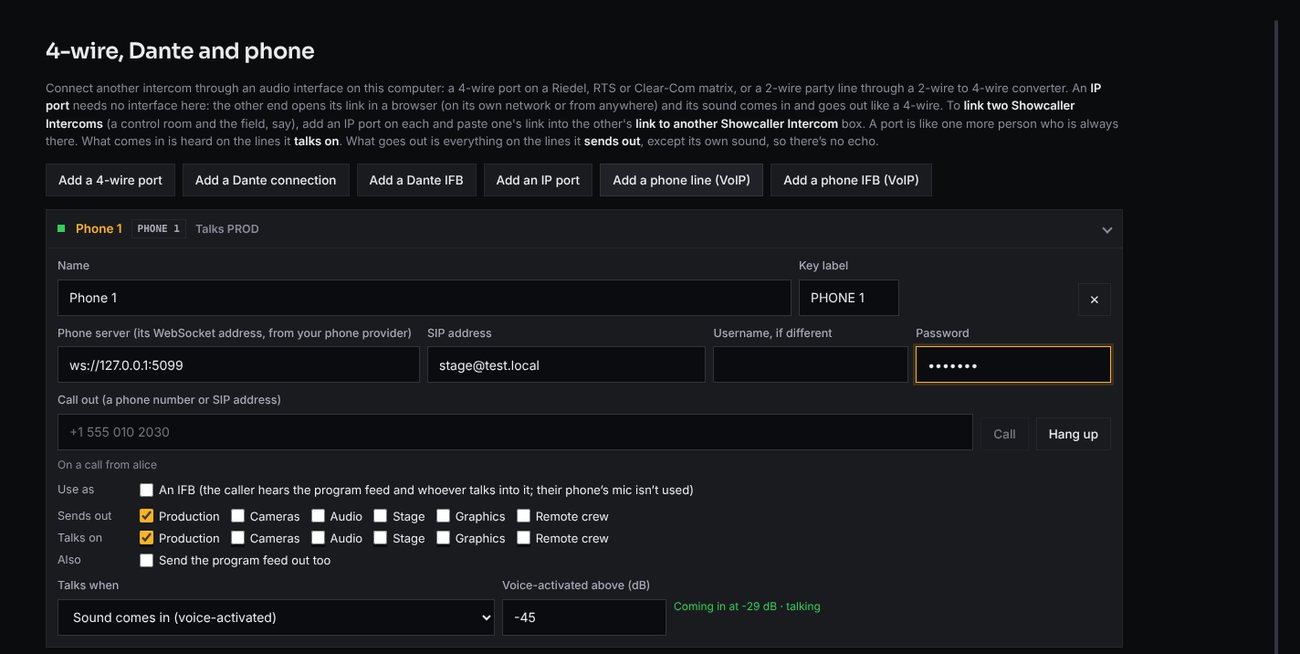
4-wire, Dante and phone: buttons to add a 4-wire port, a Dante connection, a Dante IFB, an IP port, a phone line or a phone IFB, and a phone line's card with its phone server, SIP address, password, a number to call out with Call and Hang up, and the lines it sends out and talks on

4-wire ports

Plug in a Clear-Com, RTS or Riedel matrix, or a 2-wire party line through a converter. A port is one more member of your lines, with mix-minus so there's no echo.

Dante ready

Pick any channel from 1 to 64 on Dante Virtual Soundcard or a multichannel audio interface, with routing laid out like Dante Controller. Talent IFB can go out on a Dante channel too.

Voice activated

Each port can talk always, only when there's sound above a level you set, or not at all.

IP ports

An audio port over the network instead of a cable: open the port's link on any computer and pick its audio input and output.

Link to the field

Join a field crew's Intercom Remote to the studio Frame, or to another Intercom Remote, so their lines meet. Each side keeps its own crew and settings.

Program feed

Bring program sound in from any input or Dante channel for IFB and for anyone who wants to hear the show.

License

Free for a small show. A key for the control room.

Intercom Remote: free for 4 crewUp to 4 crew connected at once, by link or the app, with everything Remote does: lines, IFB, tally, cues, ports and phone lines.
Frame: try it freeWithout a key the Frame runs as a demo: 4 crew and 2 panel positions. The Comms position, recording and the backup Frame need a key.
An Intercom keyOne key unlocks the whole system: any number of crew and panels, Comms, recording and backup. Intercom is licensed on its own; a Showcaller Screens key doesn't unlock it.
Ports don't count4-wire, Dante, IP and phone lines, and linked intercoms aren't counted toward the crew limit.
Installed by Showcaller HubShowcaller Hub installs it, keeps it up to date and holds the key with your others.

Try the test build.

Intercom Remote, Frame, Comms and Panel are in testing on the Mac now. Tell us about your show and crew and we'll send you a build to try.

Questions

Good to know.

Do I need the Frame?

Not for a small show. If one person runs comms from the Mac in front of them, Intercom Remote on that Mac is all you need. Choose the Frame when several people in a control room each need their own panel, or when you want recording and a backup.

What do I need to run it?

Intercom Remote needs one Mac with a headset for the director. The Frame needs a Mac in the rack, a Mac with the Comms app for the comms engineer, and a Mac with the Panel app or an iPad with the Intercom app at each other position. Crew need a phone, tablet or laptop with a browser and a pair of earbuds or a headset. Windows (PC) versions of the apps are coming soon.

Do crew need to install anything?

No. They open their link or scan the QR code and they're on. The free iPhone and iPad app is for crew who want comms to keep working with the screen locked; a phone browser stops the microphone when the screen locks.

Does it work over the internet?

Yes, for crew. Turn on From anywhere and their links work from any connection through showcallerstudio.com. Panels and the Comms app connect on the show network, or over Tailscale from somewhere else.

What happens if the Frame stops?

Set up a second computer as a backup Frame. It keeps a copy of the show and takes over within seconds; crew pages move to it on their own. The iPad app reconnects by its own link, so use from-anywhere links for iPads that should follow.

Can someone join by phone call?

Yes. Add a phone line with a SIP account from your phone provider and anyone can dial in to a party line, or a presenter can dial in as an IFB. You need SIP over WebSocket: a SignalWire account works, or your own FreePBX or Asterisk system with a WebRTC extension. Twilio and Telnyx don't offer plain SIP over WebSocket, so they won't work.

Can it connect to our Clear-Com, RTS or Riedel system?

Yes, through 4-wire ports on an audio interface or over Dante. Each port joins the lines you choose, so people on your hardware beltpacks talk straight to the crew on phones and panels. Tell us what you have and we'll help set it up.

Where does tally come from?

From Showcaller Switcher on the same network. Give each camera operator their switcher input and their phone shows on air and preview.

How much will it cost?

Intercom Remote is free for up to 4 crew at once, and the Frame can be tried free with 4 crew and 2 panels. Pricing for the Intercom key will be set when it's out of testing.